
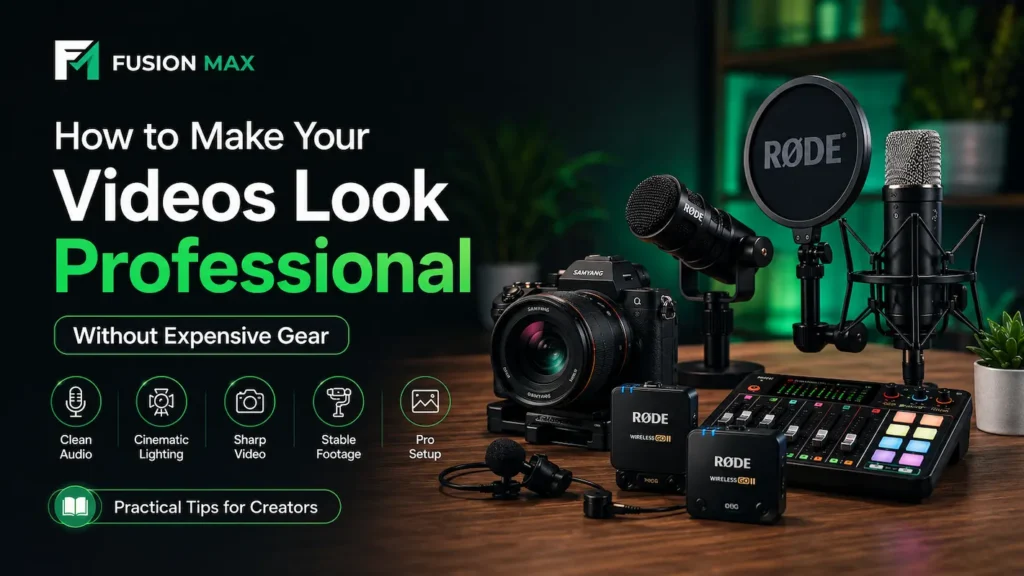
You recorded a video last week. The lighting looked fine on your phone screen. But when you played it back, the audio sounded hollow and the footage felt flat. That gap between what you expect and what you get is frustrating. The good news is that building a professional video setup does not require a ₨500,000 budget. It requires the right knowledge.
Most professional-looking videos share four things in common: clean audio quality, sharp video clarity, cinematic lighting, and a professional background setup. None of them require expensive gear.
This guide walks you through every piece of that puzzle. Whether you are shooting YouTube videos in Lahore or recording a podcast at home in Karachi, the principles stay the same.
What Makes Creator Videos Look Professional
Before buying anything, it helps to understand what actually separates amateur videos from polished ones. Here are the five elements that matter most.
- Cinematic lighting — flat or harsh light ruins skin tones and depth.
- Clean audio quality — viewers leave within seconds when audio sounds bad.
- Sharp video clarity — blurry footage signals a lack of professionalism.
- Stable footage — shaky camera movement is distracting, even in casual content.
- Professional background setup — your background tells viewers how seriously you take your work.
Most beginners focus only on the camera. But experienced creators know that audio and lighting are what truly elevate a video. A mid-range camera with a good microphone will always beat an expensive camera with built-in audio.
Essential Equipment Behind Professional Video Quality
You do not need to buy everything at once. Start with the elements that give you the most visible improvement. Here is where each piece of gear fits into the picture.
Why External Microphones Improve Content Quality
Built-in camera microphones pick up everything around you. Room echoes, fan noise, keyboard clicks. They are not designed for quality recording.
An external microphone focuses on your voice. It cuts background noise and adds a clarity that immediately sounds more professional. This single upgrade often makes a bigger difference than changing your camera.
For creators on the move, a wireless microphone for creators is the smartest investment. It gives you freedom to move around while keeping audio tight and clean.
RØDE microphones are a trusted choice in this category. The RØDE Wireless GO II is especially popular with Pakistani YouTubers and vloggers because of its compact size and broadcast-quality output. SYNCO wireless microphones are another strong option, particularly for creators looking for reliable performance at a more accessible price point.
How Camera Lenses Create Cinematic Results
Your camera body matters less than most people think. Your lens is what actually shapes the image.
A wide aperture lens creates that soft, blurred background effect you see in professional videos. This is called shallow depth of field and it is one of the fastest ways to improve video aesthetics.
Samyang lenses have become popular among content creators and filmmakers in Pakistan for exactly this reason. Their autofocus prime lenses for Sony E-mount cameras offer remarkable sharpness and beautiful background blur at a fraction of what comparable lenses cost from other brands.
The Samyang AF 35mm F1.8 is an excellent entry point for a YouTube setup for beginners. It is lightweight, fast to focus, and produces a natural, flattering field of view for talking head videos.
The Role of Lighting in Professional Videos
Cinematic lighting does not mean you need expensive studio panels. It means placing your light source intentionally.
Natural light from a window works brilliantly when used correctly. Face the window directly, not at an angle. This gives you even, soft lighting that flatters your face and reduces shadows. When natural light is inconsistent, an LED softbox or ring light gives you reliable results every time.
Good lighting solves problems that no amount of colour grading can fix in post.
Quick Reference: Creator Type vs. Recommended Setup
| Creator Type | Recommended Setup |
| YouTuber | Camera + Wireless Mic + Soft Lighting |
| Reels Creator | Smartphone Rig + Wireless Mic |
| Podcaster | USB Mic + Controlled Lighting |
| Filmmaker | Cine Lens + Professional Audio Setup |
How Professional Creators Improve Video Quality
Knowing what gear to use is only half the picture. Understanding how to use it makes a real difference. Here are four practical techniques that working creators apply every day.
Using Directional Lighting for Better Skin Tones
Directional lighting is the practice of placing your key light at a 45-degree angle to your face. This creates gentle shadow and dimension. It makes faces look more natural and three-dimensional on screen.
Avoid placing your light directly behind the camera. That flat-on lighting washes out facial features. Instead, position it slightly to one side and slightly above eye level. Your skin tones will look warmer, more accurate, and more engaging.
If you are recording a talking head setup, a second fill light on the opposite side softens the shadows further. This is the setup most professional YouTube creators use.
Creating Cinematic Background Blur
Background blur is not a filter. It is a product of your lens aperture and the distance between your subject and the background.
To create it, use a lens with an aperture of f/1.8 or lower. Then stand at least two metres away from your background. The combination produces that smooth, out-of-focus look that makes subjects pop.
Shallow depth of field also helps with polished studio background. When the bokeh effect, small imperfections become invisible. You no longer need a perfectly styled room. A clean wall and a plant three metres behind you is enough.
Improving Audio Clarity for Better Viewer Experience
Audio clarity depends on three things: your microphone quality, room acoustics, and mic placement.
Even the best podcast microphones sound average in an untreated room. Soft furnishings absorb echo. Curtains, carpets, and cushions all reduce reverb. Recording in a wardrobe full of clothes is a classic low-budget acoustic treatment that actually works.
For mic placement, keep your microphone about 15 to 20 centimetres from your mouth. A lavalier clipped to your shirt gives consistent distance during movement. A desk-mounted condenser is better for static setups like podcast recordings.
USB microphones are ideal for podcast setups where simplicity matters. Plug in, set the gain, and record. No audio interface needed.
Stabilizing Footage for Cleaner Videos
Stable footage tells your audience that you are a professional. Handheld camera shake, even subtle shake, reads as amateur.
A basic tripod solves most stability issues for under ₨5,000. For creators who walk and talk, a gimbal adds smooth, cinematic movement to shots. Phone gimbals have improved dramatically and are now a legitimate part of a mobile professional video setup.
If you shoot with Sony cameras, in-body stabilization helps. But it works best when combined with a lens that also has optical stabilization. Samyang AF lenses paired with Sony bodies deliver solid stabilized results.
Problem-to-Solution Quick Reference
| Video Problem | Recommended Equipment |
| Echo in Audio | Wireless Lavalier Microphone |
| Dark Footage | LED Video Light or Softbox |
| Shaky Footage | Tripod or Gimbal |
| Flat Background | Wide Aperture Lens (f/1.8 or lower) |
Best Creator Setup for YouTube, Reels, and Podcasts
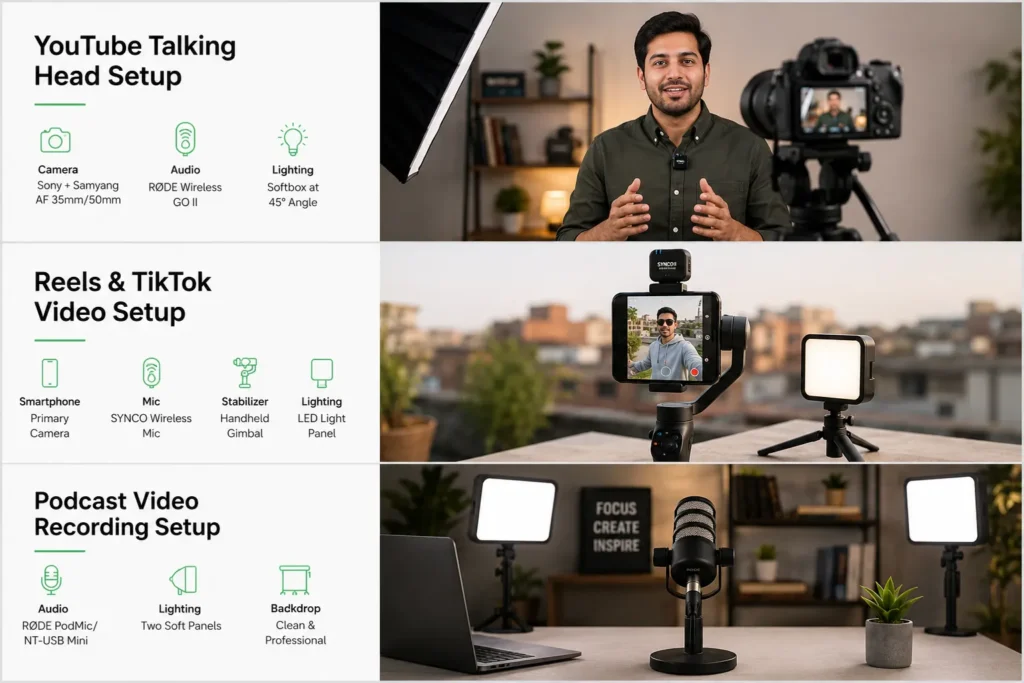
Different formats call for different approaches. This practical breakdown covers what works for each creator type in 2026.
YouTube Talking Head Setup
This is the most common format for Pakistani creators. Here is what a solid professional video setup for YouTube looks like:
Gear:
- Sony mirrorless camera with a Samyang AF 35mm F1.8 or Samyang AF 50mm F1.4 lens
- RØDE Wireless GO II clipped to your shirt for clean, wireless audio
- One softbox positioned at 45 degrees to your face for even flattering light
Positioning:
- Place the camera at eye level, about 1.5 metres from you
- Sit with your background two to three metres behind you
- This distance creates natural background blur without any post-production effort
This is a complete, real-world studio setup that many successful Pakistani YouTubers currently use.
Reels and TikTok Video Setup
Short-form vlogging equipment needs to be compact and quick to deploy. Everything below fits neatly into a backpack:
Gear:
- Smartphone as your primary camera
- Clip-on SYNCO wireless microphone for clean on-the-go audio
- Small handheld gimbal for smooth steady shots
- Portable LED light panel for indoor shots
Key Tips:
- Audio clarity matters more than picture quality for Reels
- Always use an external microphone, even for 30-second clips
- For outdoor content, shoot with the sun in front of you, not behind
Podcast Video Recording Setup
A podcast video setup is more controlled than other formats. You record in one spot, so you can invest properly in audio and lighting.
Gear:
- RØDE NT-USB Mini or RØDE PodMic connected directly via USB
- Two soft panels placed on either side of your desk
- A clean bookshelf or branded backdrop behind you
How to Build It Gradually:
- Start with audio first — a good USB microphone or podcast microphone makes the biggest immediate difference to how professional you sound
- Add lighting as a second step — two soft panels on either side of your desk eliminate harsh shadows and give you consistent, flattering results every recording
- Upgrade the camera last — by this point you already sound great and look well-lit, so the camera becomes a genuine upgrade rather than a distraction from bigger problems
This is a professional video setup you can grow into without spending everything upfront.
Common Mistakes That Reduce Video Quality
After working with hundreds of creators, the same mistakes come up repeatedly. Here are the three that cause the most damage to video quality.
Using Built-In Camera Audio
This is the most common mistake among beginner creators. Built-in camera microphones are omnidirectional. They pick up every sound in your environment equally.
The difference between built-in and external audio is often the first thing viewers notice. It does not matter how good your camera is if the audio sounds like it was recorded in a bathroom.
A microphone for vlogging does not need to be expensive. Even an entry-level SYNCO lavalier microphone will dramatically outperform your camera’s built-in mic. This is the single best video recording tip for any creator at any level.
Recording Under Ceiling Lights
Overhead ceiling lights cast downward shadows. They create dark circles under your eyes and flatten your facial features. The result looks unflattering in every recording.
The fix is simple. Turn off ceiling lights and use a dedicated front-facing light source instead. This one change can completely transform how you look on camera.
If you are recording during the day, position your desk near a window. Face the window directly. That single source of natural soft lighting often beats any artificial lighting setup.
Poor Background Framing
A cluttered background pulls attention away from you. Viewers notice what is behind you, especially during the first few seconds of a video. You do not need a fancy backdrop. A clean wall with one or two intentional props works well. What matters is that everything in the frame looks deliberate.
Use a wide aperture lens to blur the background naturally. This removes distractions while keeping your subject sharp and clear. It is one of the most effective cinematic video tips you can apply without editing.
Building Your professional video setup the Right Way
A professional video setup is not a single purchase. It is a progression. Start with the element that gives you the most return. For most creators, that is audio. For others, it is lighting. Identify your biggest weakness and fix that first.
If you are in Pakistan and looking for original, quality-tested gear, Fusion Max is the official distributor of RØDE, SYNCO, and LK Samyang products. Based in Camera Market, Lahore, we carry the full range of microphones, wireless systems, and camera lenses that match every budget and every content creator workflow.
Every product comes with genuine after-sales support and a team that actually understands filmmaking equipment and creator needs. That matters more than most people realize when something goes wrong six months after purchase.
The great video is not about gear. It is about understanding how to use what you have. Start there, and add tools as your content demands it.
This guide was prepared based on hands-on experience with audio and video equipment used by creators across Pakistan. All gear mentioned is available through Fusion Max — Pakistan’s official distributor of RØDE, SYNCO, and LK Samyang since 2010.
Frequently Asked Questions
How to Make Smartphone Videos Look Professional?
Start by shooting in 4K using your phone’s native camera app. Third-party apps often compress footage unnecessarily. Prioritise clean audio with an external wireless microphone and use soft lighting from a window or LED panel. These two elements matter far more than buying expensive gear. Keep your background simple and add a gimbal for stable footage.
Why Do My Videos Look Bad in Low Light?
Low light forces your camera to increase ISO, which adds grain and reduces sharp video clarity. The fix is simple. Add a front-facing LED panel or shoot near a window during daylight. Good cinematic lighting always produces better results than trying to fix dark footage in editing.
How Do YouTubers Create Cinematic Videos?
YouTubers treat their videos like short films. They capture wide, medium, close-up, and insert shots to build visual storytelling through coverage. Purposeful camera movement using gimbals or drones adds depth. A wide aperture lens like the Samyang AF 35mm F1.8, proper cinematic lighting, and colour grading in post complete the look.
What Is the Best Budget Microphone for YouTube in Pakistan?
SYNCO wireless microphones offer excellent audio quality at an accessible price point for Pakistani creators. For a desk-based YouTube setup, the RØDE NT-USB Mini is a reliable step up. Both are available through Fusion Max, the official distributor of RØDE and SYNCO in Pakistan.
How Do I Stop Background Echo in a Home Studio?
Echo happens when sound bounces off hard, bare walls. Add soft furnishings like curtains, carpets, and cushions to absorb it. Recording inside a wardrobe works surprisingly well. Position your podcast microphone close to your mouth. These simple changes dramatically improve audio clarity without acoustic treatment panels.